
Bluetooth FM Transmitters Explained: How Frequency Selection Affects Audio Quality
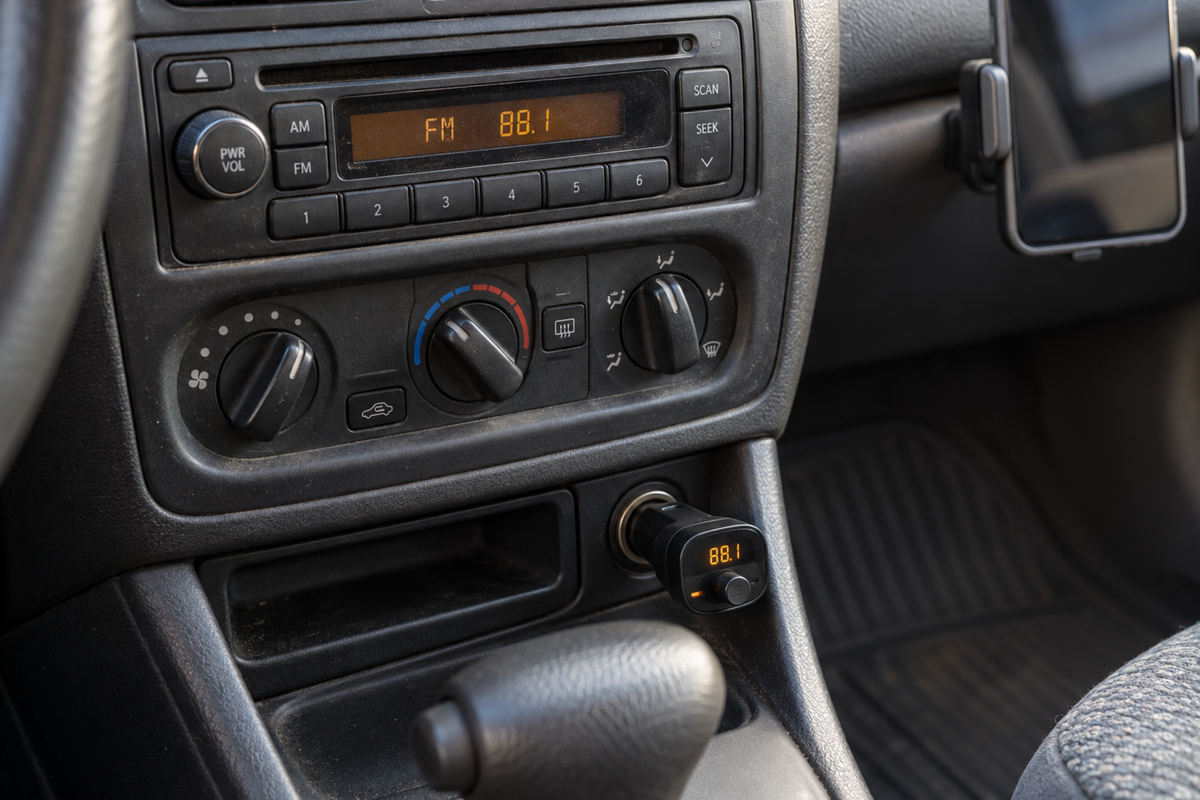
A Bluetooth FM transmitter can add wireless music and calls to a car that has no built-in Bluetooth audio. Plug it into the appropriate power socket, connect your phone, match a radio frequency, and your existing stereo becomes the playback system.
When it works well, the arrangement feels remarkably simple. When it does not, the result can include hiss, distant voices, distorted bass, or sound that becomes unreliable as you drive.
Frequency selection often explains the difference. Your transmitter shares the FM environment with broadcast stations and other radio activity. Choosing a clear channel gives its low-power signal a better chance of reaching the car stereo without unwanted competition.
However, changing frequency cannot solve every audio problem. Bluetooth interruptions, poor volume settings, electrical noise, and microphone placement belong to different parts of the system.
This guide explains how Bluetooth FM transmitters work, why channel choice matters, and how to separate interference from other faults. It also shows what to consider when looking for dependable sound rather than endlessly trying random frequencies.
How the Audio Travels From Your Phone to the Car Speakers
A Bluetooth FM transmitter uses two wireless connections with different jobs. The phone sends audio to the accessory over Bluetooth. The accessory then broadcasts an FM signal over a short distance for the car radio to receive.
The car stereo does not normally connect to the phone through Bluetooth in this arrangement. It behaves as though it is receiving a small local radio station. That distinction helps explain why a strong phone connection does not guarantee clear playback.
Inside the accessory, the received audio passes through electronics that prepare it for FM transmission. The radio then demodulates the FM signal and sends the recovered audio through its own amplification and speakers.
Each stage can affect the result. Source quality, Bluetooth behavior, transmitter circuitry, FM reception, radio processing, and the vehicle's speakers all contribute. A weakness at one stage cannot always be corrected at another.
The frequency shown on the transmitter identifies its FM carrier. The radio must be tuned to the same supported channel. If the numbers differ, the stereo may receive static, another station, or only a distorted trace of your audio.
The Bluetooth frequency is separate. Adjusting the FM channel does not change the phone's Bluetooth pairing frequency manually. Confusing these connections can lead to unnecessary re-pairing when the actual problem is a crowded radio channel.
Some accessories also support USB playback or an auxiliary input. These can change the source entering the transmitter, but the final FM connection still has the same channel-selection requirements unless you bypass it with a direct connection.
Hands-free calls introduce another path: your voice travels through the accessory's microphone back to the phone. Clear music through the stereo does not establish that the caller hears you clearly.
This complete signal chain provides a useful troubleshooting map. Ask whether the problem occurs before transmission, during FM reception, or after the radio receives the sound. Frequency selection matters most to the middle stage, not every part of the journey.
For example, your phone may show a strong Bluetooth connection while the radio plays a local broadcaster over the music. Reconnecting the phone will not remove that broadcaster because the competition occurs after Bluetooth delivery. In another case, the radio may receive a clean transmitter signal carrying silence because the phone has selected a different audio output. The symptoms can appear similar from the driver's seat, but the fixes belong to different stages. Checking the phone's output selection and the radio's tuned frequency while parked can prevent unnecessary resets and make the problem much easier to describe if you need product support.
Why a Clear FM Frequency Improves Sound Quality
A Bluetooth FM transmitter is intended to cover a short distance, not overpower a broadcast station. If a station already occupies the selected channel, both signals reach the radio and compete for reception.
FM receivers often favor a sufficiently stronger signal, a behavior known as the capture effect. However, real conditions are not always a clean choice between two sources. Similar signal strengths, reflections, or changing reception can produce distortion and intermittent interference.
You may hear broadcast speech between songs, a sudden change in sound, or roughness that varies as the car moves. These symptoms suggest radio competition more strongly than a simple problem with your music file.
A channel that appears unused can still be affected by a strong station nearby on the dial. Receiver selectivity, signal strength, and channel spacing influence how well the stereo rejects adjacent transmissions.
This is why the best channel is not always the first position where speech disappears. A little separation from strong local stations can improve the result, provided the chosen frequency is supported by both devices and appropriate for your location.
There is no universally best number. Local broadcast allocations and reception conditions differ, while car radios and transmitters support different ranges or tuning steps. Advice to use one frequency everywhere overlooks those differences.
The lowest or highest available frequency is not automatically superior. The useful feature is local availability, not its position at the edge of the dial. Test the actual environment instead of relying on a popular online suggestion.
An empty channel often produces hiss when the transmitter is off. That is normal receiver noise and does not mean the channel is already occupied. Once the transmitter is operating, a sufficiently clear received signal should reduce that background.
However, silence is not proof of vacancy either. Some radios mute weak signals automatically, and a broadcast may be too faint to recognize while parked. Listening and testing with your own audio provide more useful evidence than one quick scan.
Frequency selection therefore improves the conditions for transmission. It does not add detail to the original recording or upgrade the speakers. Its benefit is reducing competing signals so the system can reproduce your source more cleanly.
Nearby vehicles can occasionally introduce another competing short-range signal, particularly when several users choose the same popular frequency. The effect may be brief and change as vehicles separate. That does not establish a fault in your phone or prove that your transmitter has unusually weak Bluetooth. It is another reason not to treat a widely recommended channel as universally empty. Your goal is to find the cleanest practical local option, not the number most often mentioned in reviews. If a channel repeatedly becomes occupied on your usual route, keep another tested preset available and make any change only when it can be done safely.
Finding and Setting a Suitable Frequency
Make all adjustments while safely parked. Searching the dial, reading a small transmitter display, and changing phone settings can demand more attention than expected. Plan the setup before beginning the journey.
Start by identifying the FM range and tuning increments supported by the accessory and radio. Both must be able to select exactly the same channel. A regional mismatch can limit your options even when the product otherwise powers on normally.
With the transmitter off or not broadcasting, use manual tuning to inspect candidate channels. Automatic station seeking is designed to find broadcasts, so it may skip the unused positions you actually want.
Listen for speech, music, and interference from nearby stations. Choose a promising channel that seems clear locally, then set the transmitter and radio to the same frequency. Follow the manufacturer's sequence for enabling transmission. Sony USA
Play a familiar track at a sensible starting volume. Check a quieter section as well as a louder passage because background interference can be easier to hear between dense musical parts.
If reception is poor, test another clear candidate rather than repeatedly raising volume. Increasing loudness does not remove an occupying station. It can make both the wanted sound and interference more noticeable.
Automatic clear-channel scanning can simplify the search on compatible products. The transmitter samples conditions and suggests a channel, but the car radio still needs to match it. A scanner recommendation is useful, not a permanent guarantee.
Reception changes with location. A frequency that works at home may carry a strong station farther along the route. If interference develops, stop safely before retuning or let an appropriate passenger handle permitted adjustments.
Save useful channels as radio presets where possible. A small selection can make future setup easier, although each still needs checking when you travel to a different area. Do not assume a preset remains clear indefinitely.
If the stereo offers automatic alternative-frequency or traffic functions, consult its manual when it unexpectedly retunes or interrupts playback. Those behaviors can come from radio settings rather than a defective transmitter.
The aim is a repeatable process: identify a clear channel, match both devices, test ordinary audio, and keep a practical alternative. Careful setup usually provides more value than trying every frequency without a method.
Keep the radio's displayed tuning mode in mind. Some stereos allow manual frequency selection through a long press, while a short press starts station seeking. Others require changing a menu setting. If the radio keeps jumping away from an empty channel, learning that control is more useful than assuming the transmitter cannot connect. Set the desired number deliberately and confirm the display after pairing. An accessory may remember its previous frequency, while the stereo starts on another preset. A quick check of both numbers can resolve an apparently complicated connection problem before you change anything else in the system.
Volume Settings, Distortion, and Problems Frequency Cannot Fix
Once reception is reasonably clear, adjust audio levels. The phone, transmitter, app, and car stereo may each affect volume, depending on the system. These controls do not all perform the same job.
A very low source level can leave the music quiet relative to noise introduced later. Raising the stereo volume then amplifies the unwanted background along with the audio. Increasing the source appropriately may improve that balance.
However, setting every device to maximum is not a universal solution. Excessive input level or boosted equalization can overload a stage and create distortion before the radio receives the signal.
Follow the accessory's recommendations and increase levels gradually. Use a familiar recording with normal dynamics, then check whether louder passages become harsh or break up. A sensible setting should provide adequate loudness without obvious overload.
Bass boost deserves particular attention. Strong equalization can consume headroom and produce a rough sound on demanding notes. If the problem remains on several clear channels, reduce unnecessary processing before blaming FM reception.
Bluetooth interruptions have different clues. Audio that pauses completely, disconnects, or produces connection alerts may indicate a phone-link issue. Check pairing, device selection, power, and phone behavior rather than assuming another FM channel will repair it.
Source interruptions can also resemble accessory failure. A streaming app may stop because of mobile data coverage, while notifications or navigation instructions may alter playback. Testing a locally stored track can help separate those factors.
Electrical noise may present as a whine or buzz that changes with vehicle operation or connected accessories. Frequency changes may affect its audibility without resolving the source. Use appropriate troubleshooting rather than accepting one quieter channel as a complete repair.
Call quality introduces separate limitations. The microphone may pick up road noise, ventilation, or cabin echo. A caller who cannot hear you clearly is not necessarily experiencing interference on your car's FM frequency.
The car stereo itself can contribute problems. Antenna faults, poor broadcast reception generally, or speaker distortion may remain regardless of the transmitter. Compare ordinary radio stations and another available audio source when practical.
Think of frequency selection as one adjustment within a chain. It is powerful when broadcast competition is the cause, but it cannot correct clipping, restore a lost Bluetooth link, improve a badly positioned microphone, or repair vehicle equipment.
A simple comparison helps separate hiss from overload. If quieter passages reveal a steady background noise but louder passages remain clean, signal balance or FM reception may deserve attention. If the sound becomes fuzzy specifically on strong beats or loud vocals, excessive level or processing becomes a stronger possibility. These are clues, not definitive diagnoses. Use them to choose the next controlled test: another clear channel, a lower source setting, or reduced equalization. Change one variable at a time and listen again. Replacing several settings together may improve the sound without revealing which change mattered, making future troubleshooting harder.
Vehicle Layout, Travel Conditions, and Transmitter Design
The transmitter and radio antenna are separated by the vehicle's structure. Although the physical distance is short, metal panels, antenna placement, wiring, and the accessory's orientation can influence the received signal.
A socket position that works well in one car may be less favorable in another. Some accessories offer a separate control section or flexible mounting arrangement, while others sit entirely inside the power socket. Evaluate the intended installation rather than assuming identical results across vehicles.
Do not improvise antennas or modify transmission power to overcome weak reception. Choose equipment intended and compliant for your market, and use it according to its instructions. A direct audio connection may be a better solution when the vehicle layout is unfavorable.
Power compatibility also matters. Check the accessory's specified input and the vehicle socket. A product suitable for one electrical system is not automatically appropriate for every car, van, or truck.
Extra charging ports can be convenient, but their power ratings do not establish audio quality. A transmitter that charges quickly can still have poor radio performance, and an impressive Bluetooth version does not guarantee better FM circuitry.
Charging a device may change the electrical environment. If noise appears only with a particular cable or accessory connected, compare conditions while parked. Use sound equipment and approved connections rather than repeatedly adding adapters without identifying the cause.
Driving conditions change reception. Hills, buildings, tunnels, and proximity to broadcast transmitters affect which signals reach the antenna. A locally clear frequency can become less suitable even when you have not changed any settings.
Urban areas may offer fewer comfortable gaps, while a rural route can still encounter a strong local station. Neither environment guarantees perfect reception. The practical question is whether an adequately clear channel remains available along your usual journeys.
Weather is not usually the first factor to investigate for ordinary everyday problems. Start with channel occupation, matching frequencies, levels, equipment, and power. Avoid attributing recurring noise to vague environmental causes before checking the basics.
Convenience features should support safe use. Large readable controls, stable mounting, clear pairing behavior, and predictable startup can matter more than decorative lights. An accessory should not obstruct controls or tempt repeated adjustment while driving.
Choose a design that fits the vehicle and your routine. The best transmitter is not simply the one advertising the most features; it is the one that maintains a usable connection with minimal distraction and manageable setup.
Documenting the conditions can be useful when a problem repeats. Note the location, selected frequency, whether the phone was charging, and whether the noise changed with the engine running. You do not need a technical log; a few observations made after parking may reveal a consistent pattern. A problem restricted to one area suggests something different from distortion on every track everywhere. Likewise, noise that appears only with a particular charger connected deserves a different investigation from broadcast voices entering between songs. These distinctions help you avoid buying replacement equipment for a problem caused by the surroundings or another connected accessory.
Choosing Realistic Expectations and Better Alternatives When Needed
Bluetooth FM transmitters provide a practical bridge for vehicles with limited connectivity. Their appeal is using the existing radio without replacing the head unit. That convenience comes with the limitations of a short-range broadcast connection.
Do not expect frequency selection to make FM transmission lossless. The signal passes through additional processing and an analog radio link. Clear reception can sound enjoyable, but it is not equivalent to preserving every detail of the original digital source.
Music preferences influence how noticeable limitations become. Quiet acoustic recordings may expose hiss more readily, while dense music can conceal some background noise. That does not mean interference disappears; it becomes less obvious within the material.
For podcasts and spoken audio, intelligibility may matter more than subtle stereo detail. However, a noisy channel can still make quiet speech tiring to follow. Test the content you actually use instead of relying exclusively on an energetic demonstration track.
A direct auxiliary connection can avoid the FM reception stage when the stereo supports it. A suitable Bluetooth-to-AUX receiver may provide wireless phone access without broadcasting through the radio band.
Other vehicles may support compatible USB audio, a cassette adapter, or an approved stereo upgrade. Availability depends on the equipment. A USB socket intended only for charging should not be assumed to accept music playback.
Changing equipment is sensible when no suitable channel remains available or the system produces persistent noise despite careful checks. Repeatedly retuning cannot guarantee performance in a heavily occupied radio environment.
Before replacing the transmitter, identify the failure clearly. Determine whether ordinary FM reception is healthy, whether the Bluetooth connection remains stable, and whether a different source or charging arrangement changes the symptoms.
Read product information for supported frequencies, regional compatibility, controls, call features, and power requirements. Advertised charging wattage and Bluetooth generation are useful only when considered alongside the actual audio path.
A well-chosen frequency gives a Bluetooth FM transmitter room to work. Matching the devices accurately, setting sensible levels, and recognizing different fault patterns help preserve that advantage. The most satisfying setup is the one that delivers clear enough sound consistently without turning every journey into a search for another channel.
Be cautious with claims that one transmitter provides perfect sound in every vehicle. The accessory cannot control local broadcasters, the receiving antenna, or the condition of an older stereo. A fair assessment explains the setup and acknowledges those dependencies. Look for clear instructions and troubleshooting support rather than relying only on promotional descriptions of powerful bass or noise cancellation. Such phrases may describe processing features without solving radio interference. What matters is the result in your vehicle with your regular audio, at reasonable listening levels, and under the conditions in which you will actually use the system.
Choose a clear channel first, then assess the rest of the audio chain. That sequence makes setup more understandable and helps you recognize the limitations.